
Copy-pasted replies, stale templates, formatting mistakes, forgotten details, and the same paragraph rewritten with slightly worse wording.
Google Chrome™ text expander + snippet command center
Type less. Sound better. Every time.
TextRhino turns a quick shortcut into polished replies, smart forms, dynamic templates, and reusable snippets anywhere you type in Google Chrome™.
Built for Gmail™ LinkedIn Zendesk Salesforce Notion
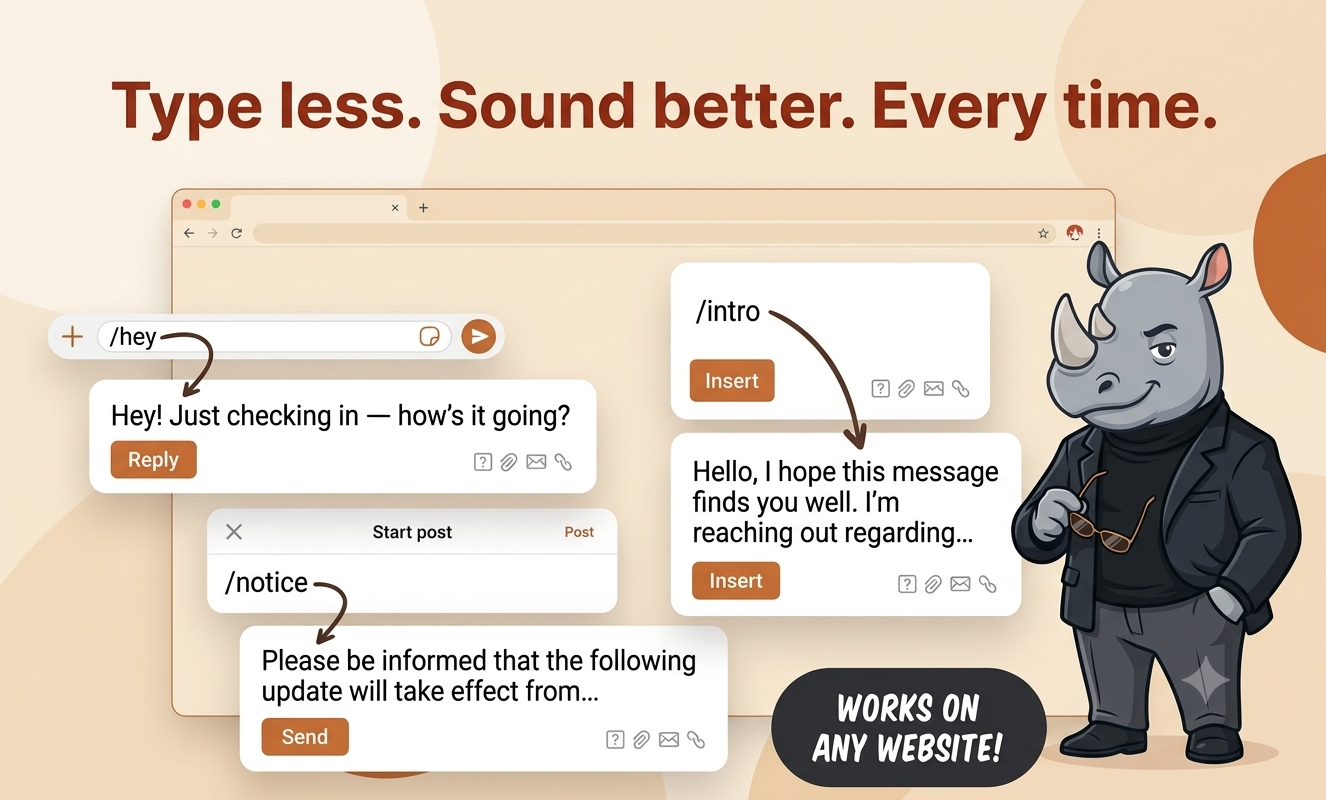
/hey Hey! Just checking in - how's it going?
/intro Hello, I hope this message finds you well...
Trusted by fast-moving professionals who write in the browser all day.
SupportSalesRecruitingFoundersOpsContent
Problem -> solution
Repetitive typing quietly taxes every busy team.
Type a shortcut. Pick the fields. Insert a complete message that sounds intentional, accurate, and ready to send.
Features
A text expansion tool that feels like a command center.
TextRhino combines the speed of a text expander for Google Chrome™ with the structure of a snippet manager and the polish of a modern writing workflow.
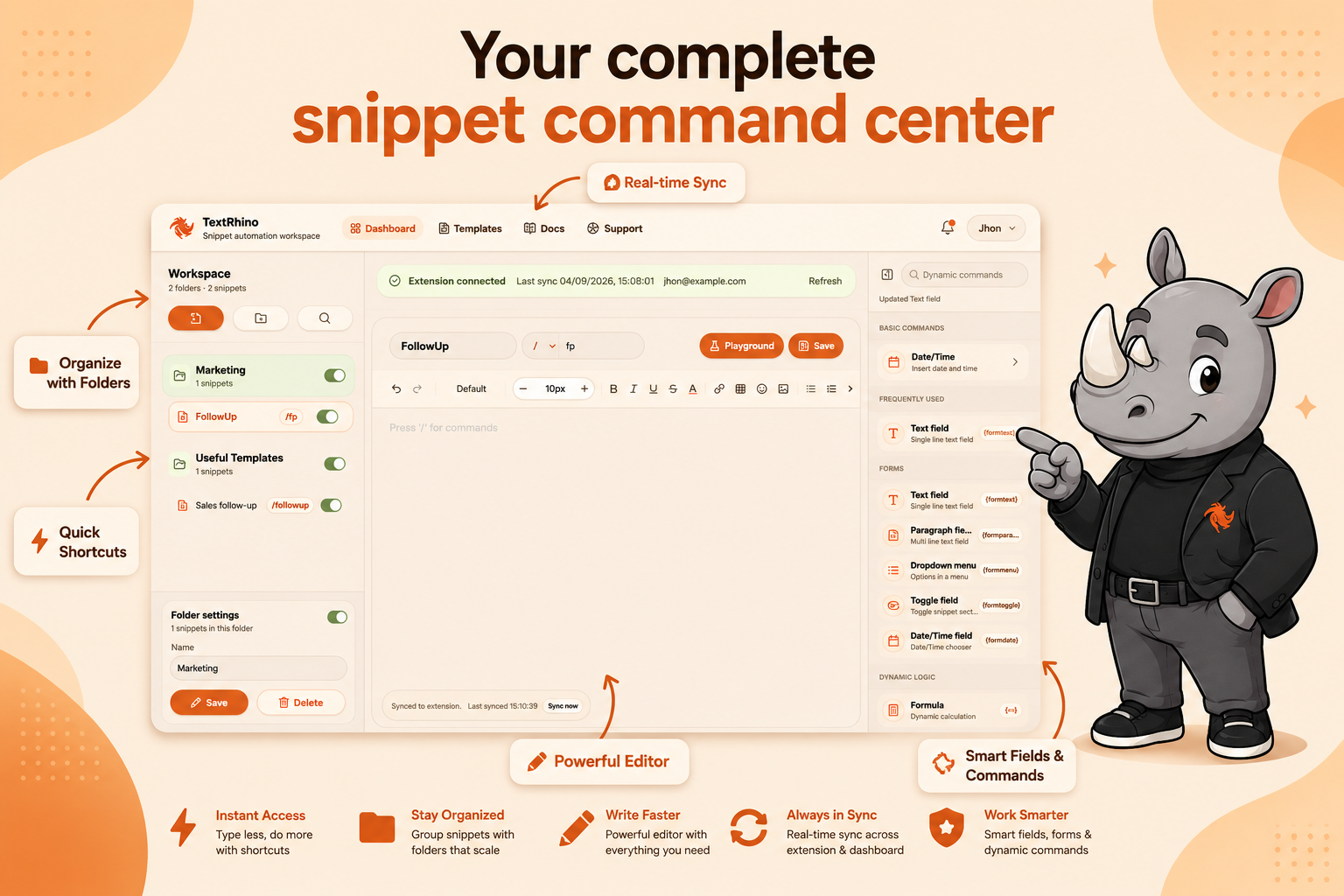
Smart Form Fields
Ask for names, order IDs, dates, notes, choices, and toggles at the moment a snippet expands.
Dynamic Dates & Calculations
Insert today, next Friday, renewal dates, totals, percentages, and formatted values without manual cleanup.
Folder Organization
Keep personal snippets, team-approved templates, sales replies, support macros, and admin notes neatly grouped.
Real-time Sync
Edit once in the dashboard and your Google Chrome™ extension stays current across your writing workflow.
Works on Any Website
Use TextRhino in Gmail™, LinkedIn, Zendesk, Salesforce, Notion, Slack, CRMs, ticketing tools, and web forms.
Beautiful Dashboard
A modern command center for writing, testing, organizing, and refining every snippet you depend on.
How it works
From shortcut to polished message in seconds.
Save a snippet
Write the reply, signature, note, clause, or message you never want to type from scratch again.
Add smart fields
Drop in text fields, dropdowns, toggles, dates, formulas, and conditional logic where the template needs context.
Type a shortcut
Enter /intro, /followup, /refund, or your own shortcut anywhere in Google Chrome™.
Insert polished text
TextRhino expands the full message with your chosen values, formatting, and team-approved language.
Interactive demo
Try the feeling of a snippet expanding.
Click a shortcut and watch TextRhino build the message with reusable fields, dynamic values, and clean formatting.
/introready
Hello Jordan, I hope this message finds you well. I'm reaching out regarding the onboarding checklist we discussed.
Comparison
A modern TextBlaze alternative for browser-first teams.
TextRhino is honest about the category: mature tools are powerful. The opportunity is a faster, warmer, more focused text expander for professionals who live in Google Chrome™.
| Capability | TextRhino | Text Blaze | TextExpander | KeyType |
|---|---|---|---|---|
| Modern Google Chrome™ extension | Excellent | Excellent | Good | Good |
| Snippet manager dashboard | Beautiful and focused | Functional | Advanced | Basic |
| Dynamic form fields | Built in | Built in | Advanced | Limited |
| Dates, formulas, and logic | Built in | Strong | Strong | Limited |
| Folder organization | Built in | Built in | Built in | Basic |
| Fast setup for individuals | Very easy | Moderate | Moderate | Easy |
| Warm modern interface | Premium | Utility-first | Enterprise | Simple |
| Years in market | Newer, growing fast | Established for several years | Most established - decades of enterprise deployments | Newer |
Use cases
Useful anywhere repeated writing slows people down.
Use TextRhino as your snippet manager for tiny shortcuts, long templates, polished messages, and recurring workflows.
Sales teams
Follow-ups, objection handling, CRM notes, demo recaps, renewal nudges, and prospecting sequences.
Support teams
Refund replies, escalation handoffs, bug triage, password resets, and QA-approved answers.
Founders
Investor updates, hiring messages, customer notes, product replies, and repeat admin.
Recruiters
Candidate outreach, interview scheduling, rejection notes, panel coordination, and feedback requests.
Content writers
Reusable briefs, metadata, intros, outlines, publishing checklists, and editorial comments.
Operations
Vendor emails, incident updates, internal requests, process checklists, and status reports.
Pricing
Simple pricing for a tool you will use every day.
Start free. Upgrade when dynamic templates, unlimited snippets, and deeper organization become part of your workflow.
$0
For getting your daily shortcuts into Google Chrome™.
- Core text expansion
- Personal snippets
- Basic folders
- Google Chrome™ extension access
$8/mo
For professionals who want dynamic templates and a command center that scales.
- Unlimited snippets
- Smart form fields
- Dates, formulas, and logic
- Real-time sync
- Priority templates
Install free - upgrade to Pro from inside your dashboard.
Install free, upgrade in-appSEO-ready blog
Built to rank for text expansion searches.
Ready when you are
Stop rewriting the replies you already got right.
Install TextRhino, save your first snippet, and make Google Chrome™ feel like it finally remembers how you work.
Add to Chrome - It's Free